Express AT 2 Satellite
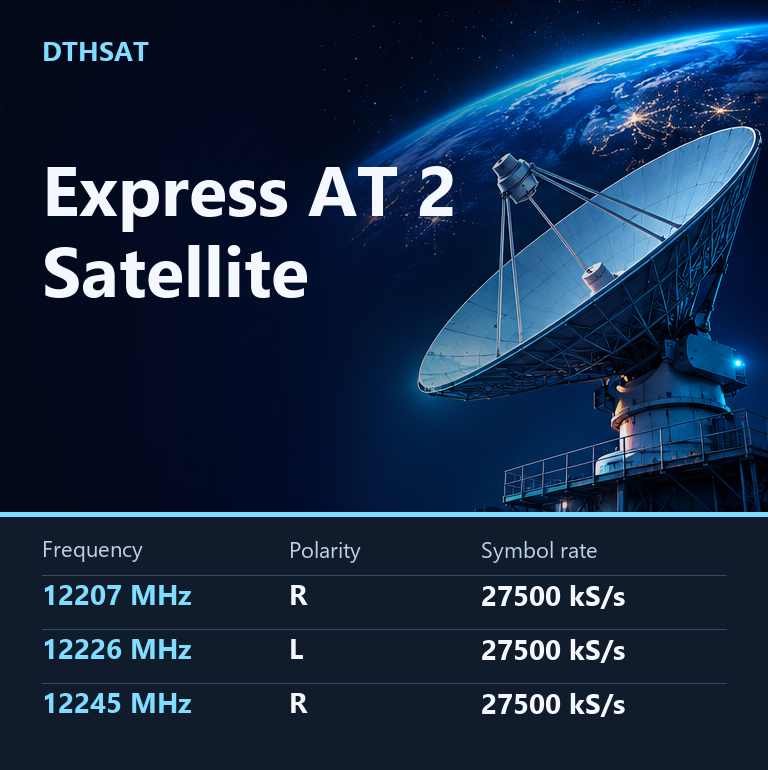
Express AT 2 Frequency Updated 12-08-2026
Express AT 2 Strong TP
Express AT 2 Satellite TV Channels List
Express AT2 140.0° East
| Channel Name | Frequency | Polarity | Symbol Rate |
|---|---|---|---|
| STV | 12207 | R | 27500 |
| Bober | 12207 | R | — |
| Dom Kino Premium | 12207 | R | — |
| Karusel (+7h) | 12207 | R | — |
| Muzika Pervogo | 12207 | R | — |
| Dom Kino | 12207 | R | — |
| Vremya | 12207 | R | — |
| Telecafé (Russia) | 12207 | R | — |
| Shop 24 | 12207 | R | — |
| Karusel International | 12207 | R | — |
| Perviy kanal Asia | 12207 | R | — |
| 24 Krim | 12207 | R | — |
| Karusel (+3h) | 12207 | R | — |
| 8 Kanal (+7h) | 12207 | R | — |
| TTS | 12207 | R | — |
| Rossiya 24 | 12207 | R | — |
| Dom Kino Premium | 12207 | R | — |
| Russian Musicbox | 12207 | R | — |
| Perviy kanal CIS | 12207 | R | — |
| Synergy TV | 12207 | R | — |
| Telekanal O! | 12207 | R | — |
| Novoe Radio | 12207 | R | — |
| Nashe Radio (Russia) | 12207 | R | — |
| Love Radio (Russia) | 12207 | R | — |
| NTV Plus Dalniy Vostok | 12226 | L | 27500 |
| Fashion One 4K | 12226 | L | — |
| Home 4K | 12226 | L | — |
| NTV Plus Dalniy Vostok | 12245 | R | 27500 |
| NTV Plus Dalniy Vostok | 12303 | L | 27500 |
| NHK World Japan | 12303 | L | — |
| NTV Plus Dalniy Vostok | 12322 | R | 27500 |
| NTV Plus Dalniy Vostok | 12380 | L | 27500 |
| Humor FM | 12380 | L | — |
| Radio Dlya Dvoih | 12380 | L | — |
| Radio Romantika | 12380 | L | — |
| Avtoradio | 12380 | L | — |
| Radio Vanya | 12380 | L | — |
| NRJ Russia | 12380 | L | — |
| DFM 101.2 | 12380 | L | — |
| Russkoe Radio | 12380 | L | — |
| Hit FM (Russia) | 12380 | L | — |
| Maximum 103.7 FM | 12380 | L | — |
| Business FM | 12380 | L | — |
| Militseyskaya Volna | 12380 | L | — |
| Comedy Radio | 12380 | L | — |
| Radio Komsomolskaya Pravda | 12380 | L | — |
| Relax FM | 12380 | L | — |
| Echo Moskva | 12380 | L | — |
| Radio Mir (0h) | 12380 | L | — |
| Love Radio (Russia) | 12380 | L | — |
| Radio Chanson | 12380 | L | — |
| Detskoe Radio Moskva | 12380 | L | — |
| NTV Plus Dalniy Vostok | 12399 | R | 27500 |
| NTV Plus Dalniy Vostok | 12456 | L | 27500 |
| NTV Plus Dalniy Vostok | 12476 | R | 27500 |
Express AT 2 KU
Express At2 Setup Guide
Express At2 is a DTHSat reference page for satellite TV users who need clear channel frequency guidance, receiver tuning help, dish setting notes and quick setup reminders. Use the available table data with your receiver menu and verify the active signal before saving channels.
Table of Contents
Quick Setup Guide
This page is written in a simple, user-friendly style for dish antenna and STB users. When you tune a satellite channel, open the installation menu on your receiver, choose the correct satellite name or orbital position, set the correct LNB type, and then enter the channel frequency details carefully. The most important values for a normal user are channel name, frequency, polarity and symbol rate.
For Ku Band receivers, many users select Universal LNB settings such as 9750/10600. For C Band, many setups use 5150, but the correct value depends on your LNB. If the signal quality is low, check dish direction, LNB skew, cable connector, DiSEqC port and weather condition before changing the saved channel list.
Required Frequency Table Format
When this page is updated with fresh frequency data, the technical table should stay clean and easy to read. Use only these columns: Channel, Frequency, Polarity and Symbol Rate. Extra technical fields should not be added unless they are specifically required later.
| Channel Name | Frequency | Polarity | Symbol Rate |
|---|---|---|---|
| Express At2 | Not listed | H / V | Not listed |
Signal and Receiver Help
If a frequency does not scan, do not assume the page is wrong immediately. Satellite channels can move to a new transponder, change symbol rate, become encrypted, or stop temporarily. Run a manual scan first, then try blind scan if the receiver supports it. Keep the dish antenna stable and move it slowly while watching signal quality, not only signal strength.
Check the current transponder details before scanning because satellite channel data can change.
Express At2 FAQ
How do I tune this channel or satellite page?
Open your STB installation menu, choose the satellite, enter frequency, polarity and symbol rate, then run manual scan. Save the result only after the receiver locks the signal.
Why is my receiver showing no signal?
No signal can happen because of wrong LNB settings, weak dish alignment, damaged cable, wrong DiSEqC port, rain fade, or an old frequency entry.
Can frequency data change later?
Yes. Satellite TV data changes often, so always verify the latest working frequency manually before tuning your receiver.
Internal Links
Useful related pages: Satellite Frequency, Strong TP, Dish Setting, LNB Frequency.
Frequency Verification Note
Check the current transponder details before scanning because satellite channel data can change.